
PC vs iPad for Golf Simulator Software in 2026
In 2026, one big reality shapes The PC vs iPad dilemma for simulator software right away, desktop computing still holds 49.11% of global OS market share, which matters when your software needs stable frame rates, fast data flow, and a smooth projector experience.
Key Takeaways
| PC strength | More compatible simulator software, easier peripherals, and simpler projection setups. |
| iPad strength | Clean interface, mobility around the house, and a lot less “desktop management” for many owners. |
| Big deciding factor | Whether you want one-device simplicity or a dedicated room computer workflow. |
| Golf simulator software | Often driven by launch monitor integrations, FSX Pro launch setup choices, and stable Windows performance. |
| Flight and other sims | Usually PC-first because of control mapping, hardware support, and system flexibility. |
| Best starting point | Compare simulator options, then match software requirements to your launch monitor and room design. |
- Q: Is The PC vs iPad dilemma for simulator software mostly about performance? A: Performance is part of it, but compatibility, projection, and setup time decide more installs in 2026.
- Q: Will iPad replace a PC for golf simulator software in 2026? A: For some users, yes, but many still keep a PC for full control, plugins, and projection reliability.
- Q: What should we check first before buying? A: Confirm your launch monitor software path, then verify device requirements for the exact edition you plan to run (PC or iPad).
- Q: Where do we find setup guidance for FSX Pro on iPad? A: Start with Foresight Sports iPad edition launch instructions.
- Q: What if we want the Windows route? A: Use the Windows-focused setup path via FSX Pro Launch guidance.
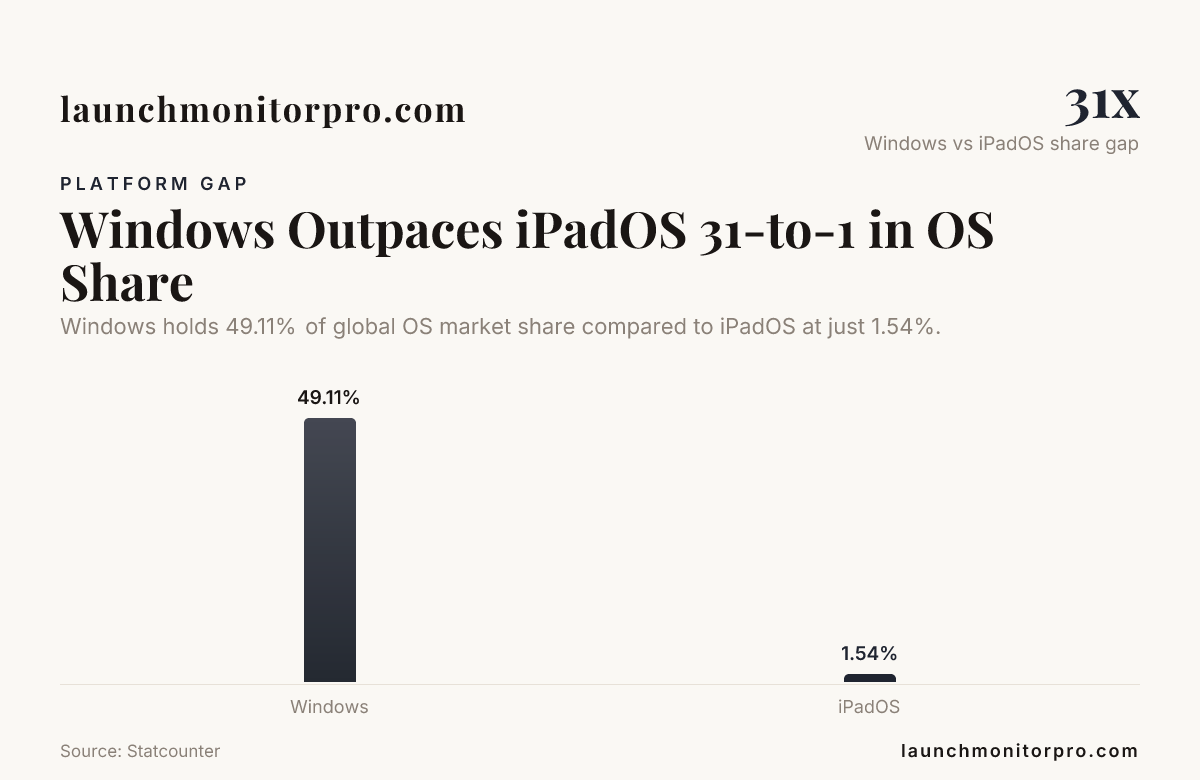
Windows holds 49.11% of global OS market share compared to iPadOS at just 1.54%.
PC vs iPad for simulator software in 2026, what actually changes?
The PC vs iPad dilemma for simulator software comes down to a few practical differences that show up the moment you try to run a session consistently.
On a PC, we can usually get a predictable “room computer” workflow, which tends to matter for golf simulator software because data, display output, and device pairing have to stay stable from tee time to tee time.
On an iPad, the setup can feel lighter and more intuitive, but simulator software must fit the iPad’s constraints, including supported device models and how launch control is handled. If you follow the official guidance for iPad edition launches, it becomes much easier to avoid “it runs for a few minutes” problems.
So the real question is not “which is better,” it is which path matches your simulator goals, your room layout, and how often multiple people will use the system back-to-back.
Brand A: Windows PC simulator setups, where the PC still wins
When we look at Windows-based simulator software systems in 2026, the PC advantage is straightforward, it is easier to match the right software edition, drivers, and projection workflow to your specific launch monitor and room equipment.
For example, Foresight Sports frames FSX Pro Launch as an available Windows PC download, “free with FSX 2020,” and positions it specifically for Windows PC setup and integration.
- More control over the full system: Multiple displays, projector settings, and calibration steps are often less restrictive.
- Better fit for mixed peripherals: Launch monitors, cameras, audio, and optional controllers are easier to support together.
- Clear compatibility guidance: The “FSX Pro Launch” path is explicitly aimed at Windows PC configuration.
For readers comparing PC options, we also recommend browsing our simulator buying guides to avoid choosing a “fast tablet idea” that later collides with software or hardware compatibility.
Our practical takeaway for The PC vs iPad dilemma for simulator software is this, if your priority is “it just runs” for repeat sessions in a dedicated room, a PC is usually the safest foundation.
Brand B: iPad editions and simplified simulator software, where iPad makes sense
iPad wins when you want the simulator experience to feel approachable and predictable, especially for casual use and quick sessions. In 2026, that is a real use case for many home owners.
With Foresight Sports, we see a dedicated setup path for “Launch Instructions (iPad Edition),” which focuses on enabling launch use of an FSX live account on supported iPad devices. This is the type of documentation you want when you are choosing the iPad route.
- Lower friction for everyday use: A consistent interface that is easy to pick up after a busy day.
- Clear iPad-specific instructions: iPad edition launch instructions exist for a reason, they help keep the workflow aligned with supported devices.
- Less “desktop management”: When you do not want to think about system-level settings, the iPad path can feel cleaner.
But for The PC vs iPad dilemma for simulator software, we cannot ignore the tradeoff, iPad-based setups work best when your simulator software and launch workflow are designed for iPad from the start.
The simulator software reality check, compatibility beats “device hype”
We keep running into the same pattern in 2026. People start with a device preference, then discover that simulator software is the limiting factor.
For golf simulator setups, the software path is often tied to launch monitor integration. That is why we recommend you verify your exact launch monitor and software combination early, not after you have already bought projectors and enclosures.
As an example, many packages in the market are bundled around PC projector-ready workflows. Retailers describe “computer package” style kits for enclosed spaces, which signals how many owners plan to run a dedicated computer for consistent graphics and projection output.
So when you research e6 connect software or e6 simulator software, keep the same mindset. Confirm which platform the workflow expects. Then confirm your display plan. Then confirm your room setup.
This is also where people looking at “tgc 2019 simulator software” often get stuck, because the sim experience is not just the app. It is the whole chain, device input, software output, and how the system behaves when the next golfer steps up.
Real-world simulator packages, how they hint at PC vs iPad decisions
In practice, you can learn a lot by looking at how the market packages simulators. If you see bundles that include projectors and a dedicated “golf-simulator computer,” that points to the common approach in many rooms.
For instance, Indoor Golf Outlet lists a Bushnell Launch Pro “Indoor Launch Monitor Projector Golf Simulator Computer Package,” designed for enclosed spaces. That kind of kit usually aligns with a PC-forward workflow for stable rendering and consistent projection use.
We also like browsing collection-style pages like Golf Simulator Packages | Rain or Shine Golf because they communicate the “all-in” integration expectation. When a package is sold as a full system, the software and display path are usually part of the design, not an afterthought.
For the PC vs iPad dilemma for simulator software, this matters because iPad setups are more likely to be best when you already know your launch monitor software supports iPad cleanly, and you have a projection plan that matches the intended workflow.
Cost reality in 2026, what your budget actually buys
Budget is where the debate gets emotional, because it is tempting to treat iPad as a “complete computer replacement.” In 2026, that can be true for office work, but simulators are different because your success depends on software compatibility and stable session performance.
One pricing way to frame it is the device-level comparison. A 13-inch iPad Pro with a Magic Keyboard and Apple Pencil is estimated around $2,000, which competes directly with high-end simulation-ready laptops once you include the accessories that a simulator setup needs.
So how should we spend the money? We would split the budget into two buckets.
- Bucket 1, software fit: Confirm the exact golf simulator software workflow, including whether you are running it on a PC or as an iPad edition.
- Bucket 2, room reliability: Plan your projector and computer placement, cabling, and calibration so the system behaves the same after the next restart.
When you do that, the “PC vs iPad” answer often becomes obvious in 2026. The iPad path is most cost-efficient when you truly want a tablet-first experience, and the software supports it with clear setup instructions.
Which one should we choose? A simple decision framework
If you are stuck, use this framework and it will usually push you toward the right answer for The PC vs iPad dilemma for simulator software.
Choose a PC if you want
- Projector-first use, stable rendering, and a dedicated room computer workflow.
- More control over peripherals and session setups.
- Compatibility with a wider range of simulator software experiences, especially when you are also researching platform-specific options like e6 simulator software or tgc 2019 simulator software.
Choose an iPad if you want
- A simpler “pick it up and start” interface for casual golf simulator software sessions.
- A clear iPad edition workflow, verified by documentation like Launch Instructions (iPad Edition).
- Less time troubleshooting system-level settings in 2026.
Consider a hybrid approach if you
- Let different people use the sim at different comfort levels.
- Want iPad convenience for quick practice, while keeping a PC for extended sessions or advanced setup.
If you want a broader “what people actually argue about” snapshot, the Reddit discussion on Bushnell Launch Pro PC vs iPad discussion is a reminder that the decision is personal, and expectations matter as much as hardware.
Final thoughts: the answer depends on your simulator workflow
The PC vs iPad dilemma for simulator software is not solved by picking a device with impressive specs. It is solved by matching your launch monitor integration, your projection plan, and your software workflow to the device that actually supports that path cleanly in 2026.
In most dedicated-room cases, we lean toward a Windows PC as the most reliable foundation for golf simulator software, especially when you want repeatable performance and straightforward projection output. If you prefer a simplified, tablet-first experience, iPad can be great, as long as you follow the iPad edition guidance and confirm device compatibility up front.
Frequently Asked Questions
Is the PC vs iPad choice mainly about performance?
Performance matters, but The PC vs iPad dilemma for simulator software in 2026 is usually decided by compatibility, projection output behavior, and how stable the launch workflow is for your exact simulator software.
Can we use iPad for golf simulator software in 2026 without constant troubleshooting?
Yes, if your setup follows a supported iPad edition workflow. For example, Launch Instructions (iPad Edition) for FSX live account usage is designed to keep the process aligned with supported iPads.
What is the safest choice for a dedicated golf simulator room, PC or iPad?
For most owners, a Windows PC is the safer foundation because The PC vs iPad dilemma for simulator software often comes down to stable rendering, peripheral support, and projection consistency during repeated sessions.
Does e6 connect software work better on PC or iPad in 2026?
We recommend verifying your exact e6 connect software workflow and intended platform first. The PC vs iPad dilemma for simulator software is less about the brand name and more about whether the required integration is built for the device you plan to run.
Is tgc 2019 simulator software worth running on iPad instead of PC?
In most cases, The PC vs iPad dilemma for simulator software points toward PC because simulator software and control mapping are typically smoother on a full computer environment for 2026 use.
Should we buy a projector-first bundle or plan a separate computer for the sim?
If you want the least friction, follow the intent of packaged kits that include the projector plus a simulator computer. That approach reduces surprises in The PC vs iPad dilemma for simulator software by aligning hardware and software expectations from the start.
For room layout, see our home simulator setup guide; for a camera unit that relies on PC software, see our Bushnell Launch Pro review.